
Free Penguin book cover template for Adobe Illustrator and Photoshop

Posted by on Oct 27, 2010 in Free stuff

Free Penguin book template for Adobe Photoshop and Illustrator

Update – Photoshop version now available!

Quickly create your own Penguin-inspired book covers (such as my Inception book covers) with these editable templates in Adobe Illustrator or Photoshop file formats.

The layout for this template uses the classic ‘Marber grid‘, created in 1961 by Romek Marber to decide upon the composition and placement of elements.

Like these…
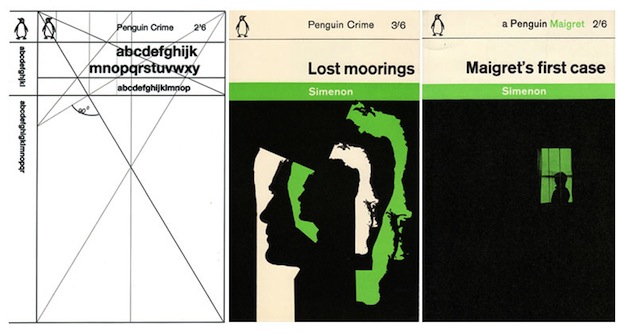
Classic Penguin books Marber grid

(image source)

The typeface used for the typography typically was Helvetica. If you don’t have it installed on your system you could use a font like Arial/Arial Black or download a free Helvetica alternative.

Download Penguin Book Template (Illustrator)

Download Penguin Book Template (Photoshop)

Leave a comment if you like them.

Feel free to let me know what you’ve done with them too. I’m always curious to see what others are doing.

Stay updated with new posts by subscribing to my RSS feed, or get new posts sent directly by signing up for email updates.

18 Comments

  1. Inception Novel Covers -Paul Murray Design
    October 27, 2010

    [...] If you fancy having a go at creating your own covers, you may be interested in my Penguin book template. [...]

    Reply
  2. The Fly in the Jar Book Cover Case Study -Paul Murray Design
    November 16, 2010

    [...] contacted me after coming across my Penguin book template, and mentioned she was looking to create a book cover for her novel, but sadly wasn’t [...]

    Reply
  3. Penguin Books Inception Novel -Paul Murray Graphic Design
    March 15, 2011

    [...] think it resembles an original Penguin book much more accurately now that I’ve adjusted the size and layout to follow the Marber grid, [...]

    Reply
  4. The History of the 'Marber Grid' - The Book Design Blog
    May 22, 2011

    [...] Classic Penguin cover Adobe Illustrator template Tagged with: Penguin  If you enjoyed this article, please consider sharing it! [...]

    Reply
  5. JW
    October 14, 2011

    how do you change the green to orange?

    Reply
    • Paul
      @
      October 14, 2011

      Simply click on the green area to select it, then select an orange colour either from the swatches panel or by double clicking on the green colour at the bottom of the tool panel and selecting an orange hue from there.

      Reply
  6. Anonymous
    October 21, 2011

    this is not a book cover template – rather just the front cover

    Reply
    • Paul
      @
      October 23, 2011

      A fair point, however creating a template for a full jacket is difficult, since the spine width will vary depending on the number of pages that make up the book. I will however release a template/guide for creating a full jacket in the near future.

      Reply
  7. Andy
    February 17, 2012

    Hi Paul, this is great! do you have the Photoshop version?

    Reply
  8. brian
    @
    March 30, 2012

    Hey Paul-

    Thanks for this. Love your inception cover. Will surf around your site for other things to look at :0

    B

    Reply
  9. Zoe
    April 23, 2012

    Hi I’d really like to get your template in either Adobe photo shop or adobe reader which ever is appropriate – do you just have the green cover? don’t suppose you have one for puffin book covers too? Trying to be a little creative at home thanks would be much appreciated.

    Reply
  10. John D. Miller
    @
    April 26, 2012

    Thanks for offering us a design formula which most of us never knew existed.

    Reply
  11. Batavier
    January 14, 2013

    Thanks! Will use these for my game collection.

    Reply

Leave a Reply

Include a link to your latest blog post after your comment?